Program 7
Develop JavaScript program (with HTML/CSS) for:
a) Converting JSON text to JavaScript Object
b) Convert JSON results into a date
c) Converting From JSON To CSV and CSV to JSON
d) Create hash from string using crypto.createHash() method .
<!DOCTYPE html>
<html lang="en">
<head>
    <meta charset="UTF-8">
    <meta name="viewport" content="width=device-width, initial-scale=1.0">
    <title>JavaScript JSON & Hash Utility</title>
    <style>
        body {
            font-family: 'Segoe UI', Tahoma, Geneva, Verdana, sans-serif;
            background-color: whitesmoke;
            color: #f0f0f0;
            display: flex;
            justify-content: center;
            align-items: center;
            min-height: 100vh;
            padding: 20px;
        }
        .container {
            max-width: 700px;
            background-color: #2c2c2e;
            padding: 30px;
            border-radius: 15px;
            box-shadow: 0 10px 20px rgba(0, 0, 0, 0.5);
        }
        h2 {
            color: #00bcd4;
            text-align: center;
            margin-bottom: 20px;
        }
        textarea, input[type="text"] {
            width: 93%;
            padding: 12px;
            margin: 10px 0;
            border: none;
            border-radius: 10px;
            background-color: #3a3a3c;
            color: #f0f0f0;
            font-size: 16px;
        }
        button {
            color: white;
            width: 96%;
            padding: 12px;
            margin: 10px 0;
            border: none;
            border-radius: 10px;
            cursor: pointer;
            font-size: 16px;
            transition: background-color 0.3s ease;
        }
        .convert-btn {
            background-color: #6217ef;
        }
        .convert-btn:hover {
            background-color: #009688;
        }
        .csv-btn {
            background-color: #f39c12;
        }
        .csv-btn:hover {
            background-color: #e67e22;
        }
        .hash-btn {
            background-color: #e74c3c;
        }
        .hash-btn:hover {
            background-color: #c0392b;
        }
        .output {
            background-color: #fbfbfd;
            padding: 20px;
            border-radius: 10px;
            color: #f303d7;
            margin-top: 20px;
            overflow-x: auto;
        }
        pre {
            white-space: pre-wrap;
            word-break: break-word;
        }
    </style>
</head>
<body>

    <div class="container">
        <h2>JavaScript JSON & Hash Utility</h2>

        <textarea id="jsonInput" placeholder='Enter JSON (e.g., {"name": "John", "age": 30})'></textarea>
        <button class="convert-btn" onclick="convertJSON()">Convert JSON to Object</button>

        <button class="convert-btn" onclick="convertDate()">Convert JSON Date</button>

        <textarea id="csvInput" placeholder="Enter JSON or CSV data"></textarea>
        <button class="csv-btn" onclick="convertToCSV()">Convert JSON to CSV</button>
        <button class="csv-btn" onclick="convertToJSON()">Convert CSV to JSON</button>

        <input type="text" id="hashInput" placeholder="Enter text for hash">
        <button class="hash-btn" onclick="generateHash()">Generate SHA-256 Hash</button>

        <div id="output" class="output"></div>
    </div>

    <script>
        function convertJSON() {
            const jsonInput = document.getElementById('jsonInput').value;
            const output = document.getElementById('output');
            try {
                const obj = JSON.parse(jsonInput);
                output.innerHTML = `<strong>JavaScript Object:</strong> <pre>${JSON.stringify(obj, null, 2)}</pre>`;
            } catch (error) {
                output.innerHTML = `<strong style="color: #ff6f61;">Error:</strong> Invalid JSON format.`;
            }
        }

        function convertDate() {
            const jsonInput = document.getElementById('jsonInput').value;
            const output = document.getElementById('output');
            try {
                const obj = JSON.parse(jsonInput);
                if (obj.date) {
                    const date = new Date(obj.date);
                    output.innerHTML = `<strong>JavaScript Date:</strong> ${date.toString()}`;
                } else {
                    output.innerHTML = `<strong style="color: #ff6f61;">Error:</strong> No 'date' field found in JSON.`;
                }
            } catch (error) {
                output.innerHTML = `<strong style="color: #ff6f61;">Error:</strong> Invalid JSON format.`;
            }
        }

        function convertToCSV() {
            const jsonInput = document.getElementById('csvInput').value;
            const output = document.getElementById('output');
            try {
                const array = JSON.parse(jsonInput);
                const headers = Object.keys(array[0]);
                const csv = [
                    headers.join(','),
                    ...array.map(row => headers.map(field => JSON.stringify(row[field], null, 2)).join(','))
                ].join('\n');
                output.innerHTML = `<strong>CSV Data:</strong> <pre>${csv}</pre>`;
            } catch (error) {
                output.innerHTML = `<strong style="color: #ff6f61;">Error:</strong> Invalid JSON format for CSV conversion.`;
            }
        }

        function convertToJSON() {
            const csvInput = document.getElementById('csvInput').value;
            const output = document.getElementById('output');
            try {
                const [headerLine, ...lines] = csvInput.split('\n');
                const headers = headerLine.split(',');
                const json = lines.map(line => {
                    const values = line.split(',');
                    return headers.reduce((obj, header, index) => {
                        obj[header] = values[index];
                        return obj;
                    }, {});
                });
                output.innerHTML = `<strong>JSON Data:</strong> <pre>${JSON.stringify(json, null, 2)}</pre>`;
            } catch (error) {
                output.innerHTML = `<strong style="color: #ff6f61;">Error:</strong> Invalid CSV format for JSON conversion.`;
            }
        }

        async function generateHash() {
            const text = document.getElementById('hashInput').value;
            const output = document.getElementById('output');
            if (!text) {
                output.innerHTML = `<strong style="color: #ff6f61;">Error:</strong> Please enter text to hash.`;
                return;
            }
            const hashBuffer = await crypto.subtle.digest('SHA-256', new TextEncoder().encode(text));
            const hashArray = Array.from(new Uint8Array(hashBuffer));
            const hashHex = hashArray.map(b => b.toString(16).padStart(2, '0')).join('');
            output.innerHTML = `<strong>SHA-256 Hash:</strong> <pre>${hashHex}</pre>`;
        }
    </script>

</body>
</html>
Output :-
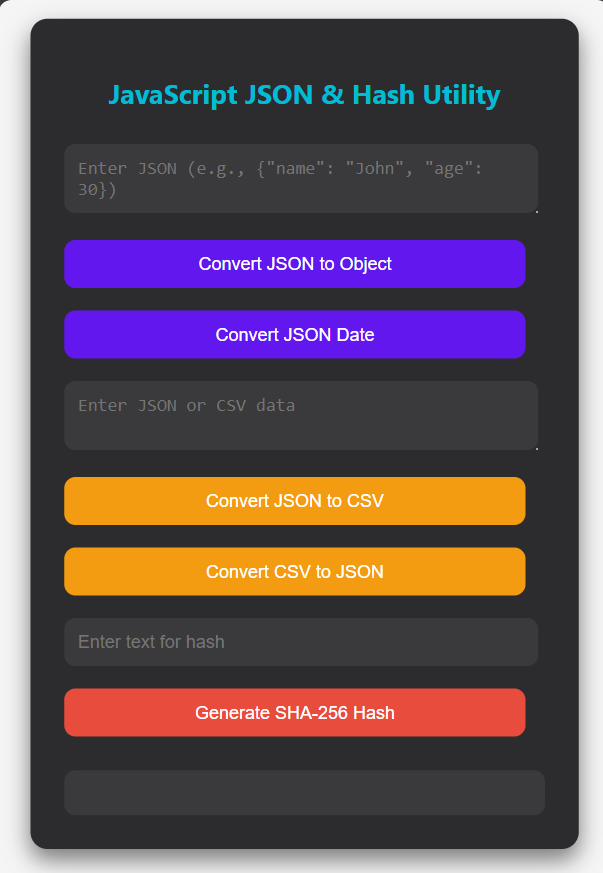
Covert JSON to Object :-
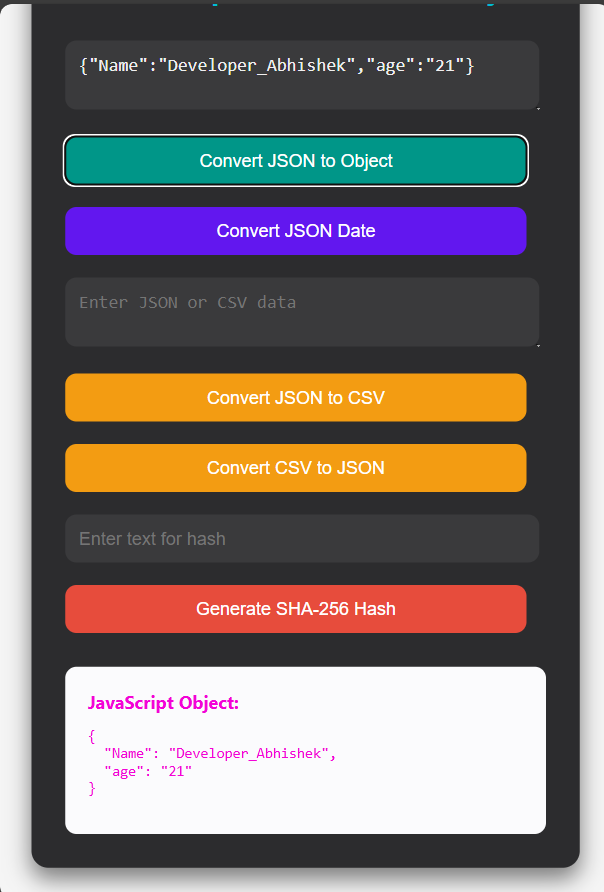
Convert JSON to Date :-
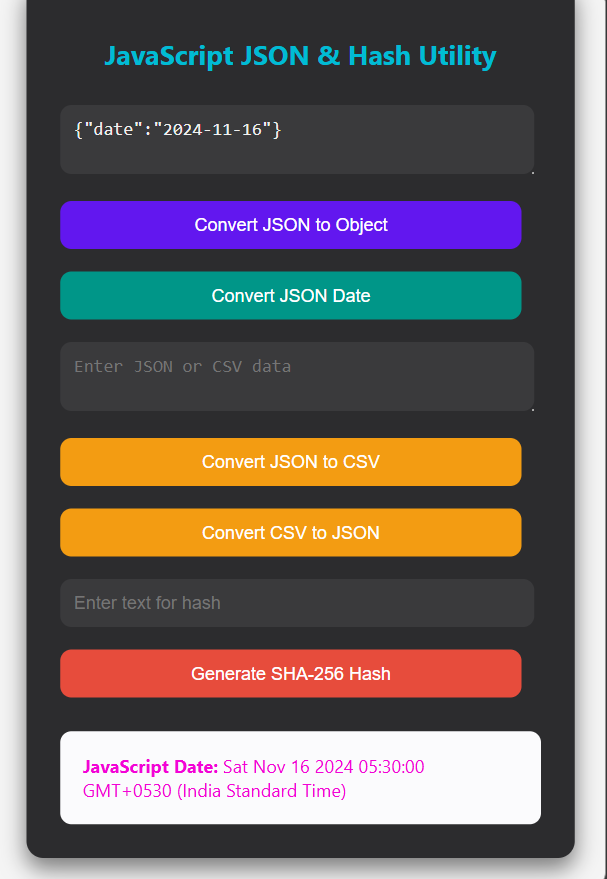
Convert JSON to CSV :-
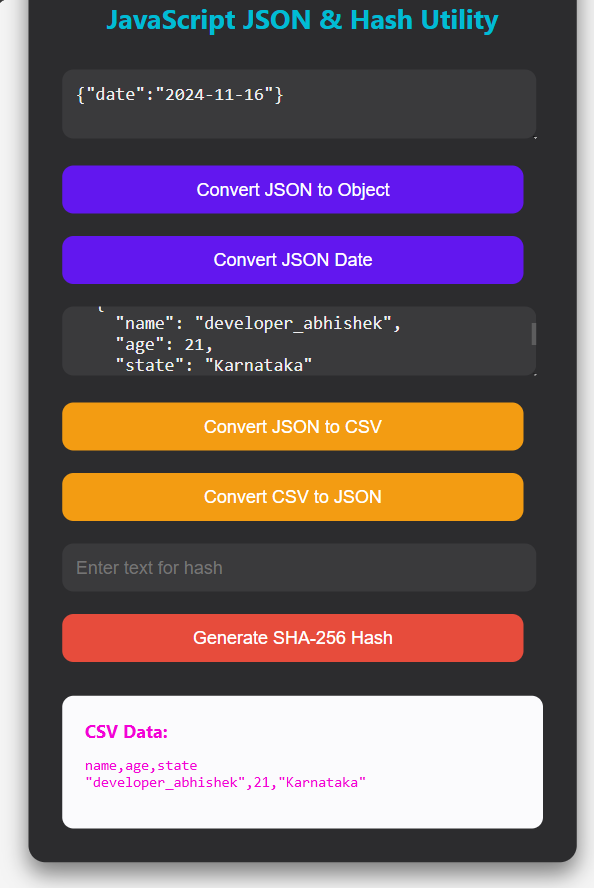
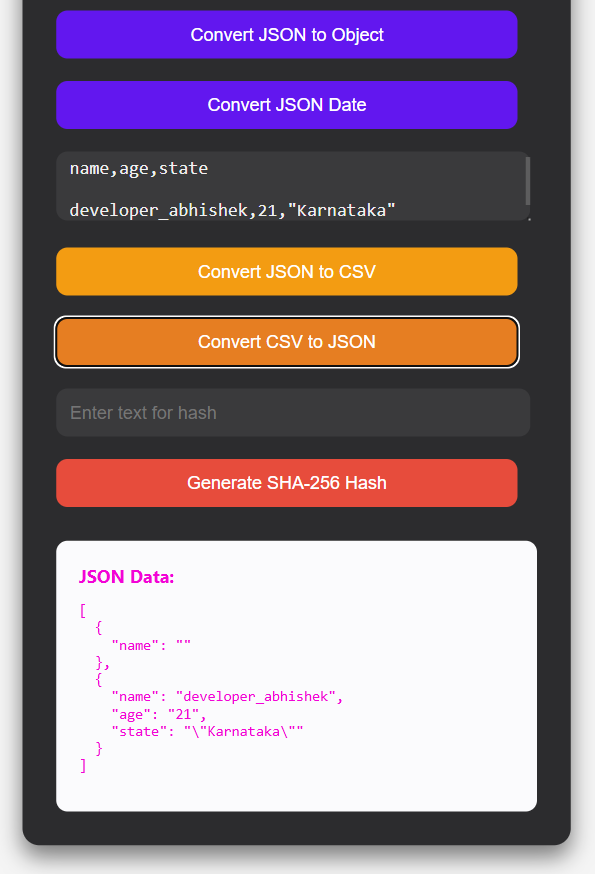
Convert CSV to JSON :-
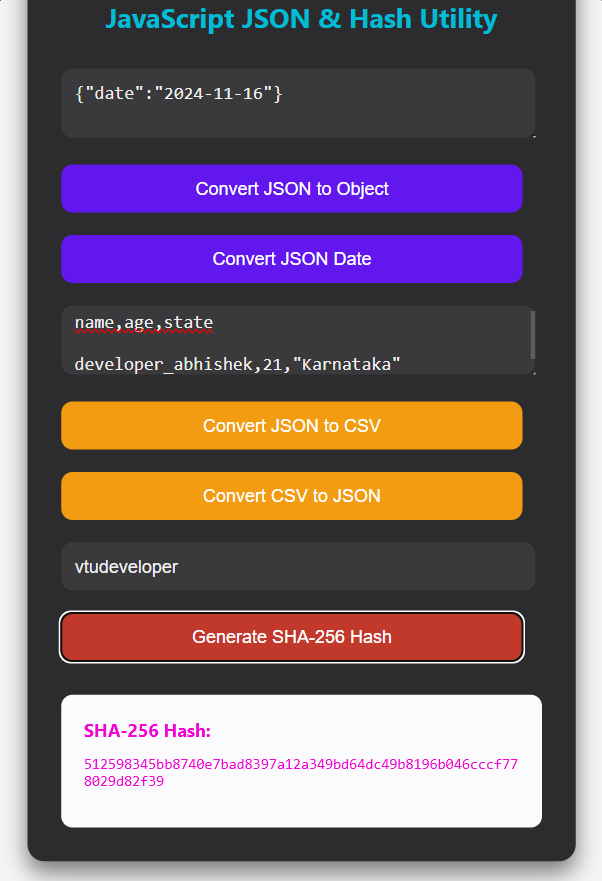
Generate SHA-256 Hash
Replay !
Share Your Thoughts