All programs
Web Technology Lab · BCSL504
Web Tech (HTML · CSS · JS)
Problem Statement Program 4
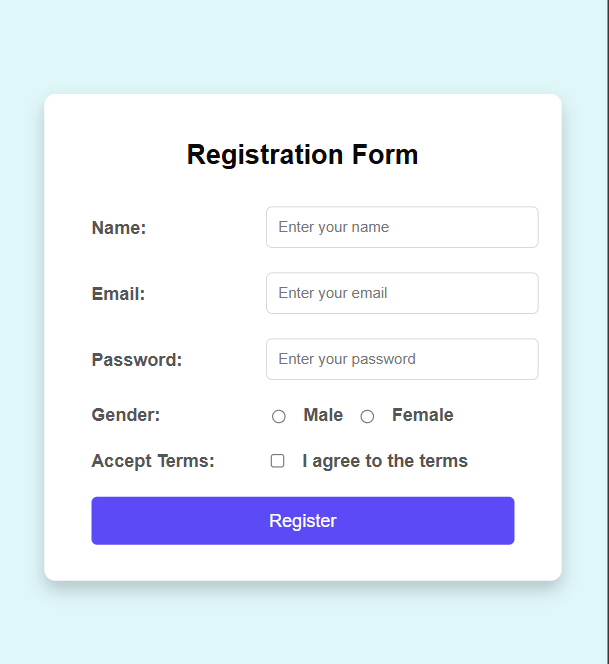
Develop an HTML page named registration.html having a variety of HTML input elements with background colors, table for alignment, and provide font colors and font size using CSS styles.
Web Tech (HTML · CSS · JS) Code Source
registration.html
<!DOCTYPE html>
<html lang="en">
<head>
<meta charset="UTF-8">
<meta name="viewport" content="width=device-width, initial-scale=1.0">
<title>Registration Form</title>

<style>
body{
    background:#e0f7fa;
    font-family:Arial,sans-serif;
}

.container{
    width:400px;
    margin:50px auto;
    background:white;
    padding:20px;
    border-radius:10px;
}

table{
    width:100%;
}

td{
    padding:10px;
}

input[type=text],
input[type=email],
input[type=password]{
    width:100%;
    padding:8px;
}

button{
    width:100%;
    padding:10px;
    background:blue;
    color:white;
    border:none;
}
</style>

</head>

<body>

<div class="container">

<h2 align="center">Registration Form</h2>

<form>

<table>

<tr>
<td>Name</td>
<td><input type="text"></td>
</tr>

<tr>
<td>Email</td>
<td><input type="email"></td>
</tr>

<tr>
<td>Password</td>
<td><input type="password"></td>
</tr>

<tr>
<td>Gender</td>
<td>
<input type="radio" name="g">Male
<input type="radio" name="g">Female
</td>
</tr>

<tr>
<td>Accept</td>
<td>
<input type="checkbox"> I Agree
</td>
</tr>

<tr>
<td colspan="2">
<button>Register</button>
</td>
</tr>

</table>

</form>

</div>

</body>
</html>
Output 1 screenshot
1
VTU Developer
Download the clean, watermark-free output image — ₹1.00
Protected content · © VTU Developer · Unauthorised distribution is prohibited